Oil change stickers for DYMO printers

Create a service reminder label and check the roll size before printing. See tool output example.

Independent tool. Confirm your printer model and supported label size.

Label details

Label size (for your roll)

Label preview

Print a test label first.

Before you print

Tool-generated PDF example

Printable PDF example: Single DYMO roll label

Actual PDF output produced with 50.8 × 50.8 mm illustrative dimensions.

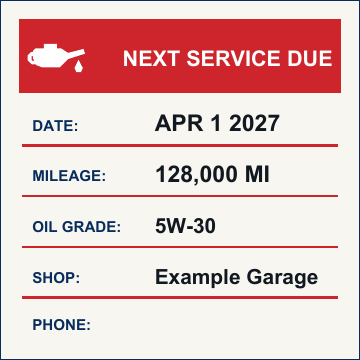
Documented example settingsTool-generated PDF example
Serviced on:
Oct 1, 2026 (2026-10-01)
Next service date:
Apr 1, 2027 (2027-04-01)
Current mileage:
123,000 MI
Next mileage:
128,000 MI
Oil grade:
5W-30
Shop name:
Example Garage
Phone / contact:
(None entered)
Sticker heading:
NEXT SERVICE DUE

Illustrative reminder: Date and mileage values are illustrative user-entered reminders, not a recommended service interval. These examples are files exported by the tool. Check a plain-paper print before using label stock.

Sample specifications & compatibility notices

  • Page / label size: 50.8 × 50.8 mm (2.0 × 2.0 in) exact PDF MediaBox (144 × 144 pt).
  • Mode count: 1 label per page (single roll label format).
  • Compatibility notice: Entered dimensions do not certify roll, printer, or material compatibility. Check your exact printer model and roll specifications against the official manufacturer documentation. DYMO states LabelWriter 5 Series printers require authentic DYMO LW labels; see the DYMO compatibility charts.
  • Calibration notice: Roll outputs at 50.8 × 50.8 mm do not include a 1-inch calibration line or square (unlike Letter sheets). Always print a plain-paper or draft test label first and physically measure the printed label with a ruler to verify feed length and print scaling (100% / Actual Size). A scale check alone does not confirm printer feed alignment.
  • Independent tool notice: This independent tool is not affiliated with or endorsed by DYMO. We make no claim of independent printer alignment validation, universal compatibility, or vendor approval. For step-by-step guidance, refer to the print alignment guide.

DYMO oil change sticker questions

What label size should I enter?

Use the width and label length printed on your roll packaging, or measure the label in millimeters. This tool uses those dimensions to make one sticker per PDF page.
How do I print the sticker at the right size?

Choose Actual Size or 100% in the print dialog and turn off Fit to Page. Print one test label first, then compare it with your roll before printing more.

Will this work with every DYMO printer and roll?

The PDF uses the dimensions you enter, but it cannot confirm printer or label compatibility. Check the exact printer model and roll number against the manufacturer's specifications. DYMO says LabelWriter 5 Series printers work only with authentic DYMO LW labels; see the official compatibility chart and our print alignment guide.

What information can I put on the reminder?

Add the next service date, mileage, oil grade, shop name, and phone number. These fields are optional, so you can leave out details you do not need.